A Teacher's Guide to Distance Learning

The options for connectivity between the teaching site and the students are increasing continuously. Students can listen to podcasts while they ride their bikes or walk around the mall; cellphones provide access to the web, graphics and video; wireless networks are available at schools and stores; and Internet access in homes is available through television cables and fiber optics.
Even with increased options for connectivity, the transmission speed is still an issue. The problem is that digital files (especially audio and video) are huge, and they require channels or cables with tremendous capacity to transmit quickly and effectively. The transmission capacity of a cable or a technology is referred to as the bandwidth. The greater the bandwidth, the greater the amount of digital information that can be transmitted per second.
There are several options available that teachers and students can use to access the Internet, including telephone, DSL, cable, fiber, satellite, and wireless delivery (see Figure 2). Note that although the table lists the maximum download speeds, these speeds will seldom be realized, due to hardware limitations, latency, simultaneous users, and many other reasons. In addition, the upload speeds are often considerably less than the download speeds.
| |||||||||||||||
Figure 2. Comparison of sample transfer rates.
Standard Telephone Modems
The standard speed for telephone modems is currently 56 Kbps. This speed can provide effective communications via e-mail and websites that do not contain extensive graphics. Advantages of standard modems include low cost (many computers have built-in modems) and the modems' compatibility with standard telephone lines. However, access to the Internet through a standard telephone modem that transmits at 56 Kbps (or less) can be excruciatingly slow -- causing jerky movies, disjointed sounds, and long wait times for downloads.
DSL Modems
DSL stands for Digital Subscriber Line. DSL modems can transmit data to users at up to 9 Mbps. The return rate (back to the ISP or Internet) may not be quite as fast -- only 640 Kbps or so. In most cases, the difference in the transfer rates is acceptable for Internet access because we are most likely to receive large files from the Internet (such as graphics and video) that require the faster rates. On the other hand, we generally do not send back as much data to the Internet (perhaps an e-mail message or a click on a hyperlink). Therefore, the slower rate on the return segment is not detrimental.A major advantage of DSL technology is that it uses standard, copper telephone lines, and it is available in most areas. A DSL modem (generally supplied by the telephone company) is required, as well as an Ethernet card for your computer.
Fiber Optic Modems
Telephone companies have also installed fiber optic cables into some neighborhoods. Transmitting via fiber can be extremely fast (up to 50 Mbps). Because of the massive bandwidth that is available, the telephone company can then deliver both television and Internet (as well as regular telephone) through the same cable. For example, Verizon offers FiOS (Fiber Optic Service) to homes and businesses in many areas. Installation is required, but is usually included when you subscribe to the service. Other telephone companies offer similar services via fiber.Cable Modems
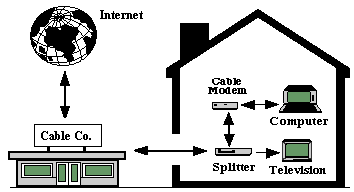
In most areas, cable companies are offering Internet access through the same cable that delivers television signals to our homes (see Figure 3). If your area has been configured for this service, you can connect a cable line to a network card on your computer (via a cable modem). The main advantage of cable modems is the bandwidth. Cable modems can bring data to your computer between 10 and 30 Mbps. If you have a 10 Mbps network card in a computer, you may be able to receive information up to that speed. A disadvantage of cable modems is that the transfer rate may be slowed if too many people in your neighborhood all connect to the Internet at the same time.